


Do you have wireless headphones and want to connect them wirelessly to your TV? Then your TV needs Bluetooth. Nowadays, most TVs come with Bluetooth as standard, but not always. It is quite simple to add Bluetooth to a TV.
-
What audio output(s) does my TV have?
-
How does a Bluetooth transmitter get power?
-
How do I put the Bluetooth transmitter in pairing mode?
-
How do I put the receiving device in pairing mode?
-
How do I ensure the video and audio are in sync?
-
How many devices can I pair with one Bluetooth transmitter at the same time?
-
Conclusion
How do I check if my TV has Bluetooth?
- Go to your TV's settings menu
- Select: Sound >> sound output
If there is an option for ‘Bluetooth’ then your TV has Bluetooth. The above can also be found in the instruction manual of your TV.
If your TV does not have Bluetooth, use a Bluetooth transmitter to add Bluetooth to your TV.
How do I connect a Bluetooth transmitter to my TV?
- Connect the Bluetooth transmitter to an audio output on your TV.
- An audio output on your TV is analog or digital.
- Power the Bluetooth transmitter.
- Put the Bluetooth transmitter and receiver (e.g., headphones) in pairing mode.
- The connection is made automatically.
Overview of names for digital & analog audio outputs on a TV:
| Analog | Digital | ||
| RCA | Cinch | Toslink | Optical |
| Audio OUT(PUT) | S/PDIF | ||
| Line OUT | Coaxial | ||
| Audio L + R | |||
| Red & white tulip | |||
| Headphone | 3.5 mm jack (AUX) |


By following the steps above, your TV will send audio via Bluetooth to a Bluetooth headphone or speaker. Be sure to turn off Bluetooth on devices that are nearby. Otherwise, the Bluetooth transmitter might automatically pair with a smartphone instead of the desired headphones.
What audio output(s) does my TV have?
Your TV may have different audio outputs. Before buying a Bluetooth transmitter, it is important to know which audio output your TV has or which audio output you want to use. The Bluetooth transmitter must be able to connect to the specific audio output(s) on your TV.
1. AUX (Auxiliary)
This is the most common name for an audio output. You usually find it on the back of your TV. It often has AUDIO OUT labeled. Several plug types fall under this category. For example, a red-white tulip (RCA) or a 3.5 mm plug (headphone).
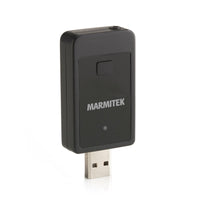
The BoomBoom 50 is an example of a Bluetooth transmitter that you connect with a 3.5 mm jack plug to an audio output.


2. Toslink
A Toslink output is an optical output (s/pdif). With this digital audio output, you send high-quality audio from a TV to headphones. If your TV has an optical output, it is always preferable to send audio through this output. This output is labeled OPTICAL. You can find it on the back or side of your TV.
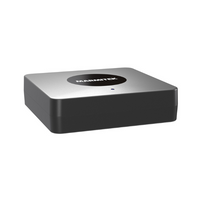
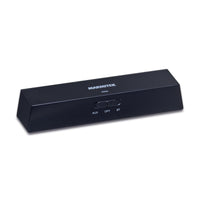
If you want to send audio through this output, choose the BoomBoom 55 HD or BoomBoom 100. The BoomBoom 55 HD and BoomBoom 100 can be connected both digitally (Toslink) and analog (3.5 mm jack, red/white).
3. Coaxial
A coaxial output is a digital output and is also found on the back of your TV and usually has an orange color. A coaxial connection is increasingly rare on TVs. The BoomBoom 55 HD can be connected both analog and digital, via Toslink or coax cable.
Once you have purchased the right Bluetooth transmitter, you only need to connect it to the appropriate port.
How does a Bluetooth transmitter get power?
Bluetooth transmitters are powered by a power adapter. There are also Bluetooth transmitters that can be connected via the USB output on the TV. This way, they are powered directly. Convenient, as it saves the need for an adapter. An example is the BoomBoom 50.
How do I put the Bluetooth transmitter into pairing mode?
Our Bluetooth transmitters are easy to set into pairing mode. Hold the power button down for a few seconds until the light starts blinking blue/red.
How do I put the receiving device into pairing mode?
The receiving device, such as headphones, will likely need to be put into pairing mode in the same way as the Bluetooth transmitter. If you need help, follow the instructions in the user manual.
Once both the Bluetooth transmitter and the receiving device are in pairing mode, they will automatically connect. You will now hear your TV's sound through the Bluetooth headphones!

How do I ensure the video and audio are synchronized?
A Bluetooth connection can sometimes cause the video you see on TV to not match the audio you hear. This is a lip-sync issue, or audio delay. With our Bluetooth transmitters, you will hardly notice this. The BoomBoom 55 HD and the BoomBoom 100 are even equipped with aptX and aptX Low Latency. The video and audio are perfectly synchronized, and you enjoy the best sound quality.
How many devices can I connect simultaneously with one Bluetooth transmitter?
This depends on the Bluetooth transmitter you have. Our Bluetooth transmitters are standardly capable of pairing with one Bluetooth device. The BoomBoom 55 HD is an exception. This one can connect simultaneously with, for example, two headphones.
Conclusion
A Bluetooth transmitter is an affordable solution to wirelessly connect Bluetooth devices to your TV. Few cables need to be connected, and the Bluetooth transmitter can be neatly hidden behind the TV.
- Enjoy your favorite TV program undisturbed
- Hear everything said on TV
- No disturbance from gaming children
Check out our options:
BoomBoom 55 HD
Why choose Marmitek?
All our products are rigorously tested and meet the high quality standards that we and our customers set for our products. We have been offering the best solutions for image and sound transmission at an affordable price for 25 years.
We make products accessible to everyone; all our products are plug & play. Moreover, we are always ready to help you find the right solution for your situation.
Marmitek. Stay connected.


