4.7 out of 5 from 300+ reviews
Delivery within 2 to 4 days
Free shipping from € 100,-
Easy return procedure within 30 days
HDMI audio extractor

HDMI audio extractor

An HDMI audio extractor separates the audio signal from an HDMI connection and sends it directly to an amplifier, soundbar or active speakers. The video signal continues to your TV, monitor or projector via HDMI. This allows you to connect devices such as a PlayStation, Xbox, Apple TV or Chromecast to audio equipment with a different type of connection. Which HDMI audio extractor you need mainly depends on your desired picture quality, the connections on your audio equipment and the audio formats you use. Read more
3 products

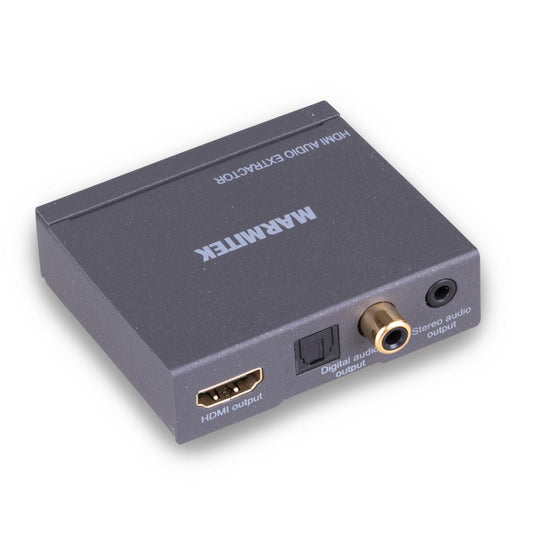
Connect AE14: HDMI audio to Toslink, coaxial or analogue

The Connect AE14 extracts audio from an HDMI source and passes the video signal through to your TV, monitor or projector. This model supports up to 4K at 30Hz and features:

  • Toslink;
  • coaxial digital audio;
  • 3.5 mm stereo;
  • HDMI ARC (audio via the digital outputs only);
  • an EDID switch.

The Connect AE14 is particularly suitable for Apple TV, Chromecast, media players and other HDMI sources where 4K 60 Hz and HDR are not required.

→ Find out how to connect the Connect AE14

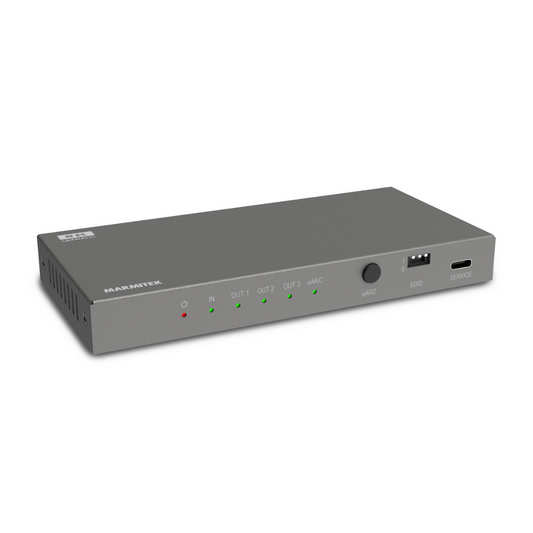
Connect AE34: HDMI 2.1 for 4K 120Hz and eARC

Do you use a PlayStation 5, Xbox Series X or a modern home cinema setup? Then the Connect AE34 is the most advanced option. This HDMI 2.1 audio extractor supports:

  • 4K at 120Hz;
  • 8K at 60Hz;
  • eARC and ARC;
  • HDR10+ and Dolby Vision;
  • VRR and ALLM;
  • Dolby Atmos and DTS:X (via HDMI);
  • HDMI, Toslink and analogue audio outputs.

This allows you to pass through high-quality video without unnecessarily limiting the capabilities of a modern console or TV.

→ Find out how to connect the Connect AE34

HDMI audio extractor for PS5 and Xbox Series X

Want to game in 4K at 120Hz? Your console and TV aren't the only devices that need to support this. Any devices you place between the console and TV must also provide sufficient HDMI bandwidth. Are you using an HDMI audio extractor that only supports up to 4K 30Hz? Then it may limit the maximum picture quality or refresh rate.

For a PS5 or Xbox Series X where you want to maintain 4K 120Hz, HDR, VRR and ALLM, an HDMI 2.1 model such as the Connect AE34 is therefore a suitable choice. Do you play at 1080p or a lower refresh rate? Then you don't necessarily need HDMI 2.1.

Extract audio from Apple TV, Chromecast or a media player

Apple TV, Chromecast and many other media players send video and audio together via HDMI. Want to send the audio separately to an older amplifier or active speakers? Simply place the HDMI audio extractor between the source and the display. The video signal continues via HDMI. You can send the audio through connections such as:

  • Toslink to a digital amplifier;
  • coaxial to compatible audio equipment;
  • 3.5 mm to a stereo system or active speakers;
  • HDMI to modern home cinema equipment.

Is 4K 30 Hz without HDR sufficient for your needs, and do you not require eARC? Then the Connect AE14 may be enough. If you want to retain 4K 60Hz, HDR or Dolby Vision, choose the Connect AE34.

Connect an older amplifier to HDMI

Older amplifiers often don't have an HDMI input, while modern media players and consoles use HDMI almost exclusively. With an HDMI audio extractor, you don't need to replace your amplifier straight away. You extract the audio signal from HDMI and make it available through a connection your existing system supports. Always check which audio input your amplifier has first. Then choose an HDMI audio extractor with Toslink, coaxial or an analogue output, for example.

What is the difference between ARC and eARC?

ARC and eARC send audio from a TV back to audio equipment via an HDMI connection. This is particularly useful when you want to hear sound from:

  • apps on your smart TV;
  • the built-in TV tuner;
  • devices connected directly to the TV.

eARC offers more audio bandwidth than ARC, making it better suited to modern audio formats and advanced home cinema setups. Are you only using a separate HDMI source and extracting the audio directly from it? Then you don't always need ARC or eARC.

Which audio output should you choose?

The best connection mainly depends on your existing audio equipment.

Toslink

A digital optical connection commonly found on amplifiers, receivers and soundbars. Suitable for stereo and 5.1 surround sound in Dolby Digital or DTS. Dolby Atmos and lossless audio formats cannot be transmitted via Toslink.

Coaxial

A digital audio connection mainly found on older receivers and other audio equipment. Supports the same formats as Toslink.

3.5 mm or RCA

Suitable for analogue stereo. Useful for older amplifiers, headphones and active speakers.

HDMI

The best choice when you want to use modern home cinema formats and features such as eARC. In addition to checking the connection, make sure your equipment supports the audio formats you want to use.

Why is EDID important for an HDMI audio extractor?

HDMI devices use EDID to communicate which video and audio formats they support. Some HDMI audio extractors have an EDID switch that lets you determine which audio format the source should output. This is useful, for example, when your TV supports different formats from your amplifier. An incorrect setting may result in no sound or cause a device to select a different audio format than intended.

How to choose the right HDMI audio extractor

Check these four features before buying:

  1. Picture quality
    Check whether you want to maintain 4K 30Hz, 4K 120Hz or another resolution and refresh rate.
  2. Audio output
    Choose Toslink, coaxial, analogue or HDMI based on your amplifier, soundbar or speakers.
  3. ARC or eARC
    This is important when you want to send audio from the TV itself to your audio system.
  4. Audio formats
    Check that both the HDMI audio extractor and your audio equipment support the stereo or surround sound format you want to use.

For an older amplifier or a basic media player, a simple solution is often sufficient. If you use a PS5, Xbox Series X or a modern eARC setup, choose an HDMI audio extractor that supports the required HDMI 2.1 features and audio formats. Marmitek offers various plug-and-play solutions that let you connect modern HDMI devices to existing audio equipment without having to replace your entire setup.

→ Learn more about how an HDMI audio extractor works

FAQ

  • What is an HDMI audio extractor?

    An HDMI audio extractor separates the audio signal from the HDMI signal, allowing you to play the sound through a speaker or amplifier.
  • When do you use an HDMI audio extractor?

    When you want to connect the audio separately to a soundbar or hi-fi system while sending the video to your TV.
  • How does an HDMI audio extractor work?

    Connect your HDMI source to the HDMI audio extractor, then connect the HDMI output to your TV and the audio output to your speaker.
  • What connections does an HDMI audio extractor have?

    Usually optical (Toslink), coaxial or analogue (3.5 mm/RCA) connections.
  • Does an HDMI audio extractor support 4K video?

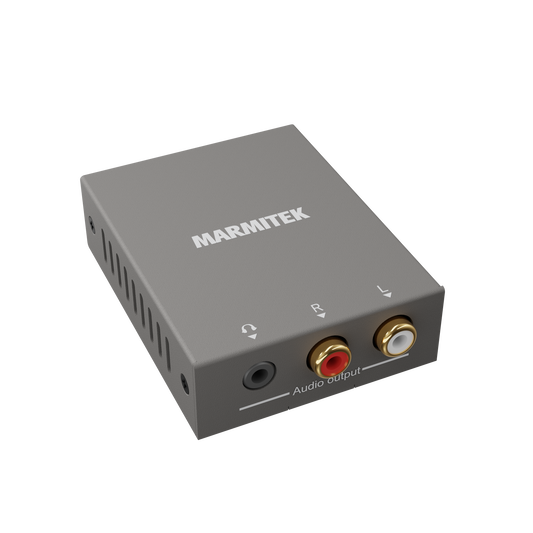
    That depends on the model. The Connect AE14 passes through video at up to 4K at 30 Hz, without HDR. Want to retain 4K at 60 or 120 Hz, HDR or Dolby Vision? Choose the Connect AE34, which supports up to 4K at 120 Hz and 8K at 60 Hz, including HDR10+ and Dolby Vision. The Connect ARC13 does not pass through video, as it only transmits audio from your TV.
  • Can I use Dolby Digital or DTS?

    Yes, these formats are supported depending on the model.
  • What is the advantage of an HDMI audio extractor?

    You maintain perfect picture quality while connecting the audio separately for better sound.
  • Does an HDMI audio extractor need a power supply?

    Yes. The Connect ARC13 is powered via USB, for example through your TV's USB port. The Connect AE14 and Connect AE34 use the included power adapter.
  • Does it also work with game consoles or streaming devices?

    Yes, with all HDMI sources such as PlayStation, Apple TV or Chromecast.
  • What is the difference between an HDMI audio extractor and a converter?

    An HDMI audio extractor separates audio from the HDMI signal, while a converter changes signals to a different type of connection.