


Always included
- HDMI transmitter
- HDMI receiver
- IR receiver | 150 cm
- IR extension cable with 1 blaster LED | 150 cm
- 2x HDMI cable | 150 cm
- Power adapter
- User manual
TV Anywhere Wireless HD 2
1080p Full HD wireless, up to 100m
Range - Entire home
Plug & play, no software
Couldn't load pickup availability
Receive 5% discount on the accessory below


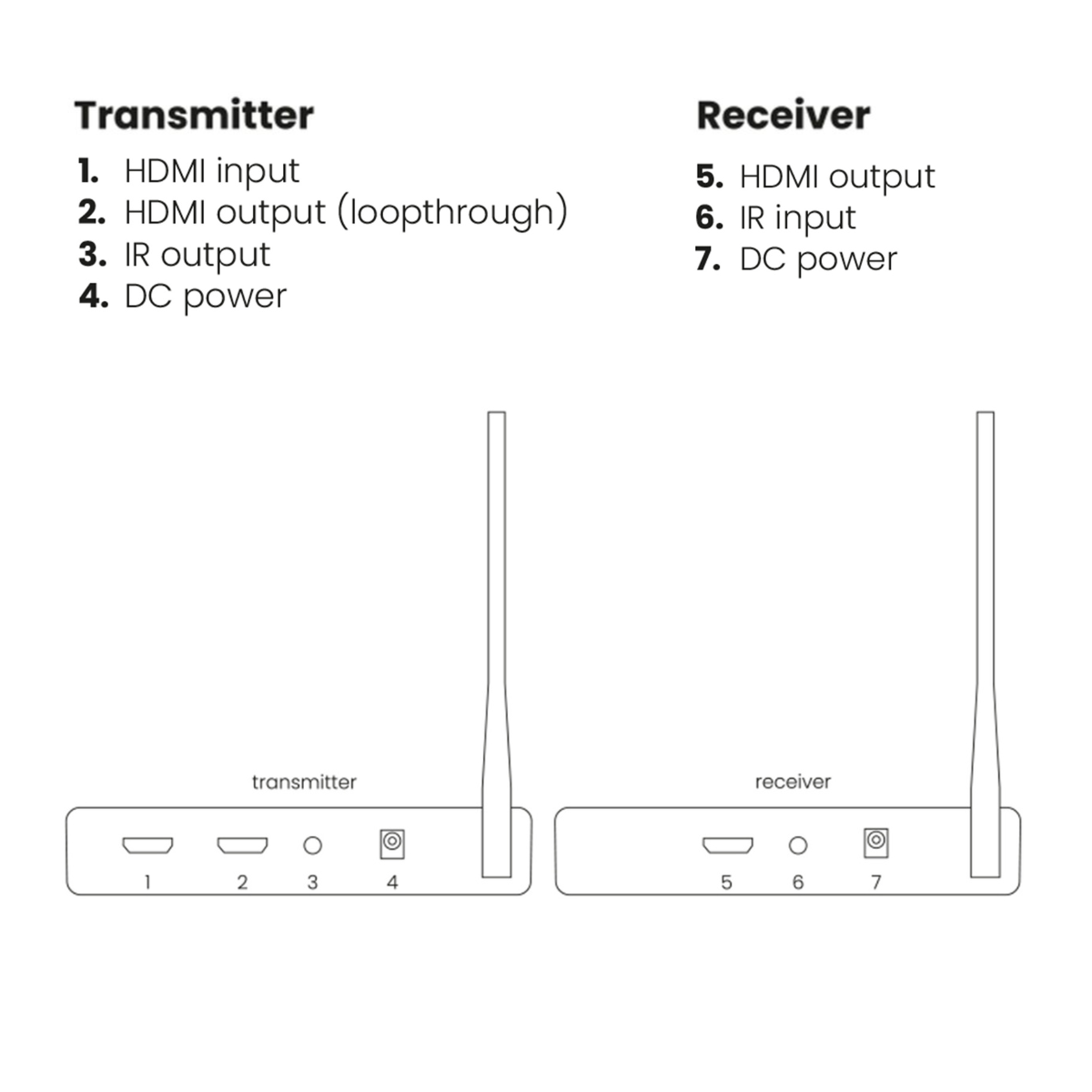

Product description
Send your decoder's HDMI signal to any location in the home.
- Watch TV anywhere in your home, without laying any cabling!
- Wireless HDMI signal transfer (up to 50 m) through walls and ceilings without quality loss or noticeable lag.
- Supports video resolutions up to 1080p (Full HD)
- Watch your favourite TV programmes or films from your decoder, media center PC or Blu-ray player in HD quality on a 2nd TV/projector anywhere in the home.
- Operate your AV equipment remotely using the infrared return feature.
- Loopthrough enables you to watch the same content at two locations simultaneously.
The TV Anywhere Wireless HD 2 offers wireless HDMI signal transmission of connected audio/video equipment to a TV or projector. The HDMI signal will even pass through walls and ceilings error-free, without any quality loss or noticeable lag. Now you can watch TV wirelessly anywhere in your home without needing a TV connection at that location, eliminating the need to lay cables.
TV in the loft, bedroom or conservatory
This makes it very easy to watch television in the loft, or place your television anywhere you want without considering the availability of a TV connection. The infrared return ensures that you can always continue to operate your TV decoder or other connected HDMI devices, even those placed out of view. So, with your TV decoder in the living room and your (2nd) TV in the bedroom, you can always switch to another television channel from your current viewing position.
Plug & Play
The TV Anywhere Wireless HD 2 consists of a transmitter (sender) and a receiver. The transmitter connects to any HDMI source such as a TV decoder, Media Center PC or Blu-Ray player. Connect the receiver to the (2nd) TV and the set is ready for wireless HDMI transmission!
Watch at two locations simultaneously
The TV Anywhere Wireless HD 2's transmitter features an additional loopthrough output, ensuring you do not lose an HDMI output on your HDMI source. This enables you to also connect a (1st) television in addition to the HDMI source. This so-called loopthrough connection enables you to simultaneously watch the same film or series at two locations in the home, and you don't have to switch cables if you want to watch football alternately in the living room and, for example, the conservatory.
Technical specifications
Downloads
Reviews
What customers say
Frequently asked questions
-
How do I install the TV Anywhere Wireless HD2?
Connect the HDMI transmitter to your source device (such as a decoder or Blu-ray player) and connect the HDMI receiver to the second TV. Both devices are powered using the supplied adapters. Follow the steps in the user manual for the best connection. -
What is the maximum range of the wireless signal?
Up to 100 metres in an open space. Up to 50 metres indoors, through walls and ceilings. This depends on the building structure and sources of interference. -
Is there any noticeable delay when watching TV?
No, the system has a latency of less than 100 ms, ensuring smooth playback without noticeable delay. -
Does the system support 4K video?
No, the TV Anywhere Wireless HD2 supports a maximum resolution of 1080p (Full HD). -
Can I continue to control my AV equipment from another room?
Yes, the infrared return function allows you to control your decoder or media box as usual, even if it is located in another room. -
Can I watch TV on two screens at the same time?
Yes, the HDMI loop-through on the transmitter allows you to watch the same content in two locations at the same time – for example, in the living room and bedroom. -
How do I know whether the transmitter and receiver are connected correctly?
Check the LED status:- Red (flashing): Powering on
- Blue (flashing): Waiting for connection
- Blue (solid): Connected
- Green (solid): Waiting for connection
- Green (flashing): Connected
- Green (slowly flashing): No video signal
- Green (rapidly flashing): Video signal received
-
Does this system also work with a beamer or projector?
Yes, as long as it has an HDMI input. -
How do I pair the transmitter and receiver of the TV Anywhere Wireless HD 2 again?
If the transmitter and receiver have lost their connection, you can pair them again as follows:- 1. Put both devices into pairing mode
Disconnect the power supply from the transmitter and receiver. Then press and hold the RESET button on both devices for 7 seconds. Reconnect the power while continuing to hold down the RESET buttons. Release the buttons as soon as the status LEDs start flashing rapidly. - 2. Connect the transmitter directly to the receiver
Use an HDMI cable to connect HDMI IN on the transmitter directly to HDMI OUT on the receiver. Wait until the status LED on the receiver remains continuously lit. The transmitter and receiver are now paired. - 3. Restart both devices
Disconnect the power adapters from both devices for approximately 20 seconds and then reconnect them. The TV Anywhere Wireless HD 2 should now connect normally again. .
- 1. Put both devices into pairing mode
-
Is the installation really Plug & Play?
Yes. As soon as the devices are correctly connected and paired, the HDMI signal is transmitted wirelessly automatically. -
Does the device support CEC or HDMI ARC?
No, these functions are not supported. Only video and 2CH PCM audio are transmitted. -
Is HDR supported?
Yes, the HDMI 2.0 interface supports HDR, but the final output is limited to 1080p resolution. -
Can I use multiple sets in one home?
This is not recommended because of possible interference between sets on the 5 GHz frequency band. -
What are the power requirements?
The units use a 5V DC adapter (2A), operating on 100–240V AC. -
What should I do if the device does not respond or freezes?
Restart both units by disconnecting and reconnecting the power adapters. -
What should I do if there is no sound or the sound quality is poor?
Make sure the HDMI source device is set to 2CH PCM stereo. Other audio formats may not be supported. -
Why is there no picture even though everything is connected correctly?
The transmitter and receiver may not be paired correctly.- Press and hold the reset button on both the transmitter and receiver for 7 seconds until the LEDs flash rapidly.
- Connect HDMI IN on the transmitter to HDMI OUT on the receiver using an HDMI cable while both are in pairing mode.
- Wait until the LED on the receiver remains continuously lit - pairing is now successful.
- Reconnect the power to both devices - rapidly flashing LEDs confirm a successful connection.
-
I don't get a picture on a second TV in another room – what should I do?
Signal loss when passing through solid walls prevents a range of 100 m. Signal loss through one solid wall (less than 30 cm thick) can be as much as 30%, reducing the range to less than 70 m. With two or more walls, the range is less than 20 m. Keep the distance shorter when there are walls in the way.
Can't figure it out?

Related products

Wireless HDMI extender 4K60

Wireless 4K HDMI extender - Possible to connect multiple displays

Wireless HDMI extender


 group
group
- Choosing a selection results in a full page refresh.
- Opens in a new window.