How do I connect a laptop to a monitor?

Monitor en beamer - tips hoe deze met elkaar te verbinden - Marmitek

1 minutes to read

Do you have a laptop with a USB-C connection and do you want to connect it to a screen or beamer with an HDMI, DVI, DisplayPort or VGA input? Then use a USB-C adapter.

With a USB -C adapter you can easily connect a monitor, television or beamer to your laptop with USB-C. This way you can change a USB-C port on your laptop into an HDMI, DVI, DisplayPort or VGA output. Sharing company presentations, videos, photos or other content on a monitor, TV or beamer becomes very easy.

watch here how to use a USB-C adapter.

Laptop met USB-C aansluiting aangesloten op een beamer met HDMI ingang - Marmitek

How do I recognize which input my screen has?
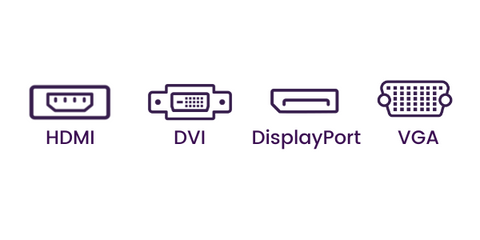
Verschillende aansluitingen op een beeldscherm - Marmitek
2 monitoren verbonden aan 1 laptop d.m.v. aan USB-C naar HDMI adapter | Marmitek

Is one extra screen not enough?

Do you want to connect two screens to your laptop and do you only have 1 HDMI port, for example? Then use your USB-C port to connect a 2nd screen to your laptop.

Watching a movie on a TV from your laptop?

Connect your laptop (with USB-C) to a television (with HDMI input, for example) and enjoy your favorite movie or simply share your best photos on a television.

Very convenient when you are traveling and have placed movies on your laptop. You can still play it on a TV without being dependent on a WiFi connection.

Smartphone aangesloten op tv dmv een USB-C naar HDMI adapter - Mamritek


Our USB-C adapters to connect a laptop to a screen

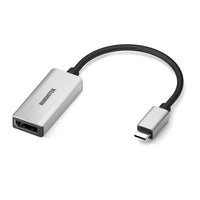
USB-C to HDMI adapter
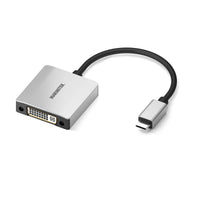
USB-C to DVI adapter
USB-C to DisplayPort adapter

USB-C to VGA adapter
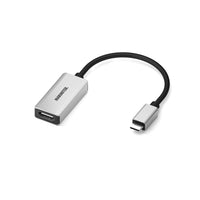
 

Connect USB C to HDMI

USB-C to HDMI adapter
86,00 zł
86,00 PLN
View products

Connect USB C > DVI

USB-C to DVI adapter
86,00 zł
86,00 PLN
View products

Connect USB C to DisplayPort

USB-C to DisplayPort adapter
86,00 zł
86,00 PLN
View products

Connect USB C > VGA

USB-C to VGA adapter
86,00 zł
86,00 PLN
View products

Why choose Marmitek?

All our products have been extensively tested and meet the high quality requirements that we and our customers set for our products. We have been offering the best solutions for image and sound transmission at an affordable price for 25 years.

We make products accessible to everyone; all our products are plug & play. Moreover, we are always ready to help you find the right solution for your situation.

Marmitek. Stay connected.

Back to blogs

Populaire producten

Connect USB C Hub 4 - Docking station - 1 in / 4 out - HDMI 2.0 4K60 - USB 3.2 - Up to Gbps Ethernet
Connect USB C Hub 4
Connect a USB-C device to Ethernet, a display and 2 USB devices Ultra-compact and lightweight USB-C hub, ideal for on the road or in your home office. Adds 4 extra ports to your laptop or mobile device. Supports 4K HDMI output for crystal clear picture quality. USB 3.2 connectivity (USB-A and USB-C) with super-fast data transfer up to 5 Gbps and Power Delivery function for charging your laptop at the same time. Compatible with all USB-C devices, including laptops, Macbooks, Chromebooks, tablets and smartphones. In our increasingly digitalized world, connectivity is crucial for a smooth and efficient workflow. This is where the Connect USB-C Hub 4 comes in, a compact and powerful hub designed to improve your connectivity and optimize your workspace. Features of the Connect USB-C Hub 4 With four versatile ports, the Connect USB-C Hub 4 offers a wide range of possibilities: HDMI 2.0 for external displays Easily connect an external display and expand your workspace. Whether you're multitasking, watching videos or giving presentations, the HDMI 2.0 port ensures razor-sharp image quality. USB 3.2 for fast data transfer The USB 3.2 ports (USB-C and USB-A) enable lightning-fast data transfers, saving you valuable time moving large files between devices. USB 3.2 (Gen 1) enables data transfer speeds of up to 5 GB per second. 1000 Mbps Ethernet for a stable network connection A reliable network connection is essential, especially for tasks that require a stable internet connection. With the 1000 Mbps Ethernet port you are assured of a reliable and fast internet connection. USB-A for various connection options Nowadays you often lack USB-A ports on your laptop. Use the USB-A port to connect USB peripherals. Effortlessly connect various devices, from keyboard, mouse to external hard drive. Benefits and applications The Connect USB-C Hub 4 not only offers various connection options, but also improves your overall productivity. By connecting multiple devices at the same time, you can effortlessly multitask, transfer files and charge devices. This makes the hub ideal for both at home and on the road. Installation and use The installation of the Connect USB-C Hub 4 is simple and user-friendly. Follow our step-by-step guide to get started quickly. Connect your devices and discover the convenience of enhanced connectivity.
129,00 zł
Connect USB C > USB A - USB-C to USB-A adapter
Connect USB C > USB A
Transforms a USB-C port into a USB-A port. Flexible 15 cm rubber cable for intensive use. High-quality aluminium housing >> robust and prevents any external interference. Turn a USB-A port into a USB-C port to charge old devices via a USB-C port. Turn a USB-C port into a USB-A port to connect USB OTG devices*. * Your mobile device must support USB OTG. For example, connect a keyboard or mouse to an iPad. Or charge your old USB-A device from a device that no longer has a USB-A port (e.g. a new car). This enables you to continue using your old charging cables, so there’s no need to buy new ones.
65,00 zł
Connect USB C to HDMI - USB-C to HDMI adapter
Connect USB C to HDMI
Connect a USB-C device to a TV, monitor or projector with an HDMI input. Turn a USB-C port into an HDMI output and easily share company presentations, videos, photos or other content on a TV, monitor or projector. With a bandwidth of 18 Gbps, it is suitable for Ultra HD 4K60 resolution (3840 x 2160/60Hz), High Dynamic Range (HDR), Deep Color and 4:4:4 chroma colours. Flexible 15 cm rubber cable for intensive use. High-quality aluminium housing >> robust and prevents any external interference. USB-C 3.1 port with Thunderbolt or DisplayPort Alternate Mode 1.2 (DP Mode 1.2) required on source device – e.g. MacBook Pro, MacMini, iPad Air (2020 and newer), iPad Pro (2018 and newer), iMac, MacBook, Surface Book 2, Chromebook, etc. List of supported devices: click here Connect a MacBook, Chromebook or laptop to a projector, or an iPad to a TV, with an HDMI input. Also suitable for connecting a 2nd external monitor if, for example, your laptop only has one HDMI output and you want to use a 2nd display.
86,00 zł
Connect USB C > Audio - USB-C to AUX adapter
Connect USB C > Audio
Connect headphones to a USB-C device. Flexible 15 cm rubber cable for intensive use. High-quality aluminium housing >> robust and prevents any external interference. Turn a USB-C port into a headphones output to connect your wired headphones. The built-in 32 bit DAC improves the sound of your headphones. The built-in 32-bit DAC supports 44.1 kHz, 48 kHz, 96 kHz, 192 kHz and 384 kHz. Improve the sound of wired headphones with this built-in 32-bit DAC instead of the standard (poor) DAC found in laptops or phones. Connect earbuds or headphones with a 3.5 mm jack plug to an iPad or smartphone with a USB-C output.
65,00 zł
Connect USB C > Ethernet - USB-C to Ethernet adapter
Connect USB C > Ethernet
Connect a USB-C device to a cabled network (LAN). Flexible 15 cm rubber cable for intensive use. High-quality aluminium housing >> robust and prevents any external interference. Turn a USB-C port into a Gigabit Ethernet port to connect to a wired network, in case Wi-Fi is not available, out of range or performing slowly. Compatible with USB version 3.1. Connect your laptop or smartphone to a wired LAN if Wi-Fi is poor or unavailable (e.g. in hotels).
86,00 zł
Connect USB C > VGA - USB-C to VGA adapter
Connect USB C > VGA
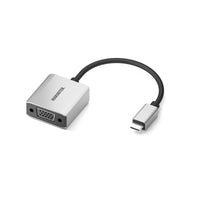
Connect a USB-C device to a TV, monitor or projector with a VGA input. Flexible 15 cm rubber cable for intensive use. High-quality aluminium housing >> robust and prevents any external interference. USB-C 3.1 port with Thunderbolt or DisplayPort Alternate Mode 1.2 (DP Mode 1.2) required on source device – e.g. MacBook Pro, MacMini, iPad Air (2020 and newer), iPad Pro (2018 and newer), iMac, MacBook, Surface Book 2, Chromebook, etc. List of supported devices: click here Turn a USB-C port into a VGA output and easily share company presentations, videos, photos or other content on a TV, monitor or projector. Supports resolutions up to 1920 x 1200 at 60 Hz. Connect a MacBook, Chromebook or laptop to a projector, or an iPad to a presentation screen, with a VGA input.
86,00 zł
Connect USB C > DVI - USB-C to DVI adapter
Connect USB C > DVI
Connect a USB-C device to a TV, monitor or projector with a DVI input. Flexible 15 cm rubber cable for intensive use. High-quality aluminium housing >> robust and prevents any external interference. USB-C 3.1 port with Thunderbolt or DisplayPort Alternate Mode 1.2 (DP Mode 1.2) required on source device – e.g. MacBook Pro, MacMini, iPad Air (2020 and newer), iPad Pro (2018 and newer), iMac, MacBook, Surface Book 2, Chromebook, etc. List of supported devices: click here Supports resolutions up to 1920 x 1080 at 60 Hz. Turn a USB-C port into a DVI output and easily share company presentations, videos, photos or other content on a TV, monitor or projector. Connect a laptop to a projector, or an iPad PRO to a presentation screen, with a DVI inpu
86,00 zł
Connect USB C to DisplayPort - USB-C to DisplayPort adapter
Connect USB C to DisplayPort
Connect a USB-C device to a TV, monitor or projector with DisplayPort. Flexible 15 cm rubber cable for intensive use. High-quality aluminium housing >> robust and prevents any external interference. USB-C 3.1 port with Thunderbolt or DisplayPort Alternate Mode 1.2 (DP Mode 1.2) required on source device – e.g. MacBook Pro, MacMini, iPad Air (2020 and newer), iPad Pro (2018 and newer), iMac, MacBook, Surface Book 2, Chromebook, etc. List of supported devices: click here Turn a USB-C port into a DisplayPort output and easily share company presentations, videos, photos or other content on a TV, monitor or projector. With a bandwidth of 21.6 Gbps, it is suitable for Ultra HD 4K60 resolution (3840 x 2160/60 Hz). Connect a MacBook, Chromebook or laptop to a display or projector and share company presentations. Also suitable for connecting a 2nd external display, creating an extended desktop area for your laptop.
86,00 zł