


Are you a professional, teacher, or business traveler who frequently gives presentations? Then a presentation clicker is your secret weapon for a smooth and convincing presentation. Discover everything about presentation clickers here: from benefits and key features to practical usage tips.
What is a presentation clicker?
A presentation clicker is a handy device that works as a remote control for presentations. It allows you to wirelessly navigate through slides and highlight important information on the screen. Additionally, you can zoom in on details and even control multimedia in your presentation, all while moving freely around the room and maintaining eye contact with your audience.
Benefits of a presentation clicker
- Flexibility and freedom of movement: No more hassle of staying near your laptop. With a presentation clicker, you move freely around the room while delivering your presentation, allowing for dynamic interaction with your audience.
- Improved Interaction: Use features like a digital pointer and zoom to emphasize key points on your screen. This way, you maintain the attention of your audience, keeping them engaged and involved.
- Multifunctionality: Use a presentation clicker as a mouse for your laptop and as a remote control for videos and music. It's an all-in-one solution for any presentation.
Key features and functions
- Digital pointer and spotlight: Highlight important information on your screen with a digital pointer or spotlight, keeping your presentation clear for your audience.
- Zoom function: Magnify details to convey complex topics clearly and reinforce your message.
- Air Mouse function: Turn your presentation clicker into a wireless mouse, allowing you to control your computer from anywhere in the room.
- Range and battery life: A presentation clicker has a long range and extended battery life, providing you with the reliability and flexibility you need for any presentation.

How to choose the right presentation clicker?
When choosing a presentation clicker, it's important to check if it works with your computer (Windows, MacOS). Also, consider the range and additional features like controlling videos and music.
Tips for using a presentation clicker
- Preparation: Prepare your presentation in advance. Test the functions of your presentation clicker before your presentation to avoid surprises.
- Interaction: Make eye contact with your audience, ask questions, and actively engage them in your presentation.
- Optimal use of features: Experiment with the digital pointer, zoom, and other functions to make your presentation lively. This also makes complex information more understandable.
Leave a lasting impression
A presentation clicker is an essential tool for professionals who frequently present. It enhances interaction and effectiveness during your presentations. Thanks to its versatility, ease of use, and advanced features, it improves your presentation. This way, you leave a lasting impression on your audience.
Upgrade your presentations with the WPR 400 presentation clicker
Discover the benefits of the WPR 400 presentation clicker, specially designed to enhance your presentation experience. Ready to impress? Improve your presentations today with the WPR 400 and show what you're capable of.
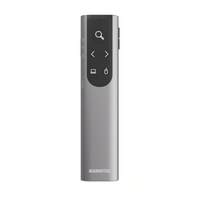
WPR 400
WPR 400 - Presentation clicker by Marmitek
- Digital pointer, spotlight, and zoom function
- Air Mouse
- Range up to 100 meters
- Battery life of 100 days
- USB-C and USB-A dongle
- Compatible with MacOS/Windows
Want to know more about the WPR 400? Click here for more information.


