Connect multiple displays to 1 HDMI device

HDMI splitter: Sluit meerdere beeldschermen aan op 1 HDMI-apparaat

5 minutes to read

There are several situations where you want to connect multiple displays to one HDMI device. Maybe you want to create an impressive gaming setup, give a multi-screen presentation, or simply expand your workspace. Whatever your reason, connecting multiple displays to one HDMI device is easy to achieve with an HDMI splitter. In this article, we explain in a few steps how to connect multiple screens to 1 HDMI device.

Step 1: Check the connections of your HDMI device

Before you start connecting multiple screens, first check whether your device has an HDMI connection. Most modern devices, such as laptops, game consoles, and Blu-ray players, have HDMI ports. Other connections that you may find on your HDMI device include VGA, DVI, DisplayPort and USB.

Step 2: Get an HDMI splitter or matrix switch

To connect multiple displays to one HDMI device, you need a device that distributes or switches the video signal between the different displays. There are two main types of such devices: HDMI splitters and matrix switches.

  • HDMI splitter: An HDMI splitter takes the video signal from one source (such as a laptop or game console) and splits it across multiple displays. This is a good option if you want to connect multiple displays, but only have one video output on your HDMI device. However, keep in mind that all monitors will display the same image.
  • Matrix switch: A matrix switch allows you to connect multiple sources (such as a laptop, game console, and Blu-ray player) to multiple displays and independently switch between which display receives which signal. This is a better option if you want to connect several displays and control each screen individually.
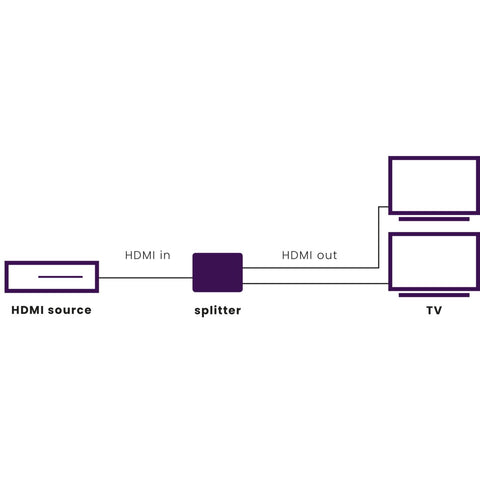
Step 3: Connect the displays to the splitter or matrix switch

After you have purchased the correct HDMI splitter or matrix switch, you are ready to connect your screens. Follow these steps:

  • Connect the HDMI cables or other video cables to the outputs of the splitter or matrix switch.
  • Connect the other ends of the cables to the inputs on your displays.
  • Connect the power cable (if necessary) from the HDMI splitter or matrix switch to a power outlet.

Step 4: Connect the HDMI device to the splitter or matrix switch

Now that your displays are connected to the splitter or matrix switch, you need to connect the HDMI device. This could be a laptop, game console or Blu-ray player, for example. Follow these steps:

  • Connect the HDMI cable or other video cable to the output of your HDMI device.
  • Connect the other end of the cable to the input of the splitter or matrix switch.
  • Turn on the HDMI device and displays.

Step 5: Configure your HDMI device and displays settings

After connecting everything, you may need to configure your HDMI device and displays settings to make sure everything displays correctly. This may include adjusting the resolution, image format, and image adjustments.

Advantages of using a Marmitek HDMI splitter for connecting multiple screens to 1 HDMI device

- Connect up to 8 displays to 1 HDMI device. Examples of HDMI devices are: TV decoder, game console, DVD player.

- Switch between displays without having to swap cables. With an HDMI splitter, you don't have to keep changing HDMI cables if you want to watch movies or play games on a different screen. The output of the HDMI splitter is automatically active when the connected TV is switched on.

- Support for different screen resolutions with EDID. If you want to connect screens with different resolutions, such as a 1080p (Full HD) and 4K (Ultra HD) TV, an HDMI splitter with EDID ensures that the maximum video resolution is displayed on the HDMI output.

Connect multiple devices to 1 screen

Do you want to connect multiple HDMI devices to 1 screen? Then use an HDMI switch. An HDMI switch is useful if your TV has too few HDMI ports or if you simply want fewer cables to run to your TV.

Conclusion

Connecting multiple displays to one HDMI device is a great way to expand your entertainment space. By using an HDMI splitter or matrix switch, you can easily connect multiple screens and enjoy a seamless viewing experience. Whether you want to create an impressive gaming setup or give a presentation with multiple screens. an HDMI splitter offers a solution.

Ready for the future

With Marmitek UHD 2.0 switchgear you prevent connection problems and get the best out of your (existing) equipment. This range is HDMI 2.0/HDCP 2.2 compliant and therefore the best solution for connecting your HDMI devices and TVs.

19.99 kr
19.99 SEK
View products

19.99 kr
19.99 SEK
View products

19.99 kr
19.99 SEK
View products


Back to blogs

Populaire producten

Split 712 - HDMI splitter 8K - 1 in / 2 out - HDMI 2.1 | 8K60 | 4K120 | HDCP 2.3
Split 712
Split your HDMI signal and play it over 2 TVs/projectors Eliminates the need to swap HDMI cables when viewing video content on another display or projector. Suitable for Ultra HD 8K 60 Hz signal (7680 x 4320/60 Hz), Dynamic HDR, Deep Color and 4:4:4 chroma colors. Supports 4K 120 Hz signal from gaming consoles, including Variable Refresh Rate (VRR), Auto Low Latency Mode (ALLM), Quick Frame Transport (QFT) and Quick Media Switching (QMS). Supports Dolby Atmos and DTS:X and all other common audio formats. With built-in repeater and equalizer to correct any signal loss. Use the downscale function to display videos in the highest possible resolution on all screens.This 8K HDMI splitter allows you to connect two TVs/monitors to your gaming consoles, such as the Xbox Series X and PlayStation 5, or a media box. This is perfect for alternating between gaming on the TV and a large screen or if you want to show a football match on 2 TVs at the same time in a larger room.The Split 712, with 4K120 and 8K60 support, is especially suitable for connecting your gaming consoles. This 8K HDMI splitter supports important gaming features such as Variable Refresh Rate (VRR) for smooth display of frame rates and Auto Low Latency Mode (ALLM) for minimal delay between input and action.With the downscale function of this HDMI splitter you can watch 8K content on an 8K television and send the same signal in a lower resolution to a 4K television. This is useful because not all televisions currently support 8K resolution.The solid metal housing ensures a stable and interference-free connection. Compare all our HDMI splitters
1,116.00 kr
Split 312 UHD - HDMI splitter 4K - 1 in / 2 out
Split 312 UHD
Split your HDMI signal and play it over 2 TVs/projectors Allows video and audio from your digital TV decoder, satellite receiver, game console or Blu-ray player to be simultaneously displayed on 8 screens (TV or projector). Split your HDMI signal to a 2nd TV or projector. Eliminates the need to change HDMI cables if you want to watch movies or play games on another screen. Supports HD Audio and all other common audio formats. Suitable for Ultra HD 4K, Full HD 1080p and all 3D formats. If required, select your maximum video resolution on the HDMI output, using the unique EDID switch. Supports HDCP 2.2 for playback of protected 4K Ultra HD content. The Split 312 enables you to split the HDMI signal from your decoder or another HDMI source to 2 TVs. Ideal when you want to show the same presentation or film on 2 screens at the same time. The switch supports 4k2k and 3D and is therefore suitable for connecting to your Ultra HD TV(s).Compare all our HDMI splitters
558.00 kr
Split 612 Pro - HDMI splitter 4K 60Hz - 1 in / 2 out - HDMI 2.0
Split 612 Pro
Split an HDMI signal to 2 TVs or projectors. Suitable for Ultra HD 4K60 resolution (3840 x 2160/60 Hz), High Dynamic Range (HDR), Deep Color, and 4:4:4 chroma colors. Use the downscale function to display videos in the highest possible resolution on all screens With built-in repeater and equalizer for correcting any signal loss. Supports Dolby Atmos and DTS:X as well as all other common audio formats. Interference-free thanks to solid metal, interference-proof quality housing. Optionally determine the maximum video resolution on the HDMI output yourself using the unique EDID switch. Suitable for business use, such as meeting rooms, retail presentations, or digital signage applications. Easy to integrate by professional AV installers into commercial installations where reliability is essential. With the Split 612 Pro, you can split the 4K HDMI signal from your decoder or another HDMI source to 2 TVs or projectors. Ideal when you want to display the same presentation, video, or information simultaneously on 2 screens, both at home and in professional environments.This 4K HDMI splitter is perfectly suitable for connection to the latest Ultra HD equipment with HDMI 2.0 and HDCP 2.2 and offers a stable and high-quality solution for both private and business use. Compare all HDMI splitters
893.00 kr
Split 614 Pro - HDMI splitter 4K 60Hz - 1 in / 4 out - HDMI 2.0
Split 614 Pro
Split a 4K HDMI signal into 4 HDMI outputs Suitable for Ultra HD 4K 60 Hz signals, High Dynamic Range (HDR), Deep Color, and 4:4:4 Chroma colors. Use the downscale function to display videos in the highest possible resolution on all screens. With built-in repeater and equalizer for correcting any potential signal loss. Supports Dolby Atmos and DTS:X as well as all other common audio formats. Interference-free thanks to a solid metal, interference-free quality housing. If desired, manually set the maximum video resolution on the HDMI output using the unique EDID switch. Suitable for business use, such as meeting rooms, retail presentations, or digital signage applications. Easy to integrate by professional AV installers into commercial installations where reliability is essential. With the Split 614 Pro, you can split the 4K HDMI signal from your decoder or another HDMI source to 4 TVs or projectors. Ideal when you want to show the same presentation, video, or information simultaneously on 4 screens, both at home and in professional environments.This 4K HDMI splitter is perfectly suitable for connection to the latest Ultra HD equipment with HDMI 2.0 and HDCP 2.2 and offers a stable and high-quality solution for both private and business use. Compare all HDMI splitters
1,116.00 kr
Split 618 Pro - HDMI splitter 4K 60Hz - 1 in / 8 out - HDMI 2.0
Split 618 Pro
One signal, multiple screens The Split 618 Pro makes it easy to distribute an HDMI signal from, for example, a media player, laptop or decoder to eight displays or projectors. This is ideal for presentations, video walls, digital menu boards or information kiosks. Perfect image, even with different resolutions Thanks to the built-in video downscaler, it is no problem to use 4K and Full HD screens together. While traditional HDMI splitters adjust to the lowest resolution (and apply this to each output), the Split 618 Pro always delivers the highest image quality per connected screen. Expandable up to 22 screens Need more than eight outputs? Simply connect multiple Split 618 Pros together. With up to three Split 618 Pro HDMI splitters in a daisy chain, you can create up to 22 HDMI outputs. Robust and reliable The metal design protects the electronics and prevents interference. The built-in repeater amplifies the HDMI signal so that each screen receives the best possible quality. Thanks to the DC power supply with screw connector, the power connection is always secure. Applications Digital menu boards in hospitality and retail Meeting and conference rooms Trade show stands and presentations Video walls in shops or offices Sports bars, canteens and hospitality venues with multiple screens Main features in detail HDMI 2.0 – supports 4K60 resolution 1 HDMI input, 8 HDMI outputs Video downscaler – mix of 4K and Full HD screens Built-in repeater – amplifies signal per output DC power supply with screw connector Sturdy metal housing Daisy-chain function (max. 3 HDMI splitters) Compare all our HDMI splitters
1,673.00 kr
Split 814 Pro - HDMI splitter 8K 60Hz - 1 in / 4 out - HDMI 2.1
Split 814 Pro
One source, multiple screens The Split 814 Pro makes it easy to distribute content from a single HDMI source to four displays. This saves time, cabling and costs. Ideal in bars, restaurants or stores where the same content needs to be visible in multiple locations. High-quality image performance With support for 8K@60Hz and 4K@60Hz, you benefit from razor-sharp image quality. The HDMI splitter also supports HDR10+, Dolby Vision and other common HDR formats. This ensures that details remain visible, even in dark or very bright scenes. Flexible audio routing Thanks to the digital audio output, you can route the sound separately from the TVs to a soundbar, amplifier or audio system. This gives you more flexibility when setting up your installation and allows you to separate audio and video easily. Reliable in professional environments The sturdy metal housing and EDID management guarantee stable operation, even during long-term use. Thanks to HDCP 2.3 support, the HDMI splitter works with virtually all modern sources, such as media players, set-top boxes and game consoles. Applications Hospitality: display the same TV signal on multiple screens Retail: show promotional videos throughout the store Meeting rooms: present content on multiple screens Waiting areas: control information screens in sync Home cinema: share content to multiple TVs or projectors Key features in detail Resolutions: up to 8K@60Hz, 4K@120Hz, 1080p HDR support: HDR10+, Dolby Vision, HLG Audio formats: Dolby Atmos, DTS:X Extra audio output: digital optical output for external audio system Compatibility: HDCP 2.3, EDID management Inputs/outputs: 1x HDMI in, 4x HDMI out, digital audio out Housing: robust metal, suitable for 24/7 use Compare all HDMI splitters
1,673.00 kr